
Computer Skills to Put on a Resume
Computer skills are useful in almost every profession. Whether you are applying for an administrative role, a creative position or a job in technology, clearly listing relevant digital skills can help employers understand what you can do. In the UK, a resume is usually called a CV, but the same principles apply: include skills that match the role and show how you have used them.
What are computer skills?
Computer skills are the abilities needed to use computers, software and digital tools effectively. They range from everyday tasks, such as writing documents and managing email, to specialist work involving programming, data analysis or cybersecurity.
Common computer skills to include
Office and productivity software
- Word processing: creating, editing and formatting documents in Microsoft Word or Google Docs.
- Spreadsheets: using Microsoft Excel or Google Sheets to organise information, apply formulas, create charts and analyse data.
- Presentations: preparing clear slides using PowerPoint, Google Slides or similar software.
- Email and calendars: managing correspondence, appointments and shared calendars in Outlook, Gmail or other platforms.
Communication and collaboration tools
Many employers use digital tools to coordinate work, particularly across teams and locations. Relevant skills may include using Microsoft Teams, Slack, Zoom, Google Meet or project-management platforms such as Trello, Asana and Monday.com.
Data and administration
Depending on the role, useful skills may include accurate data entry, database management, maintaining digital records, producing reports and using customer relationship management (CRM) systems. If you have used a particular platform, name it—for example, Salesforce, HubSpot or a relevant database system.
Creative and content software
For design, marketing and media roles, consider listing tools such as Adobe Photoshop, Illustrator, InDesign, Canva, Premiere Pro or content management systems such as WordPress. Include only software you can use confidently and that is relevant to the job.
Technical skills
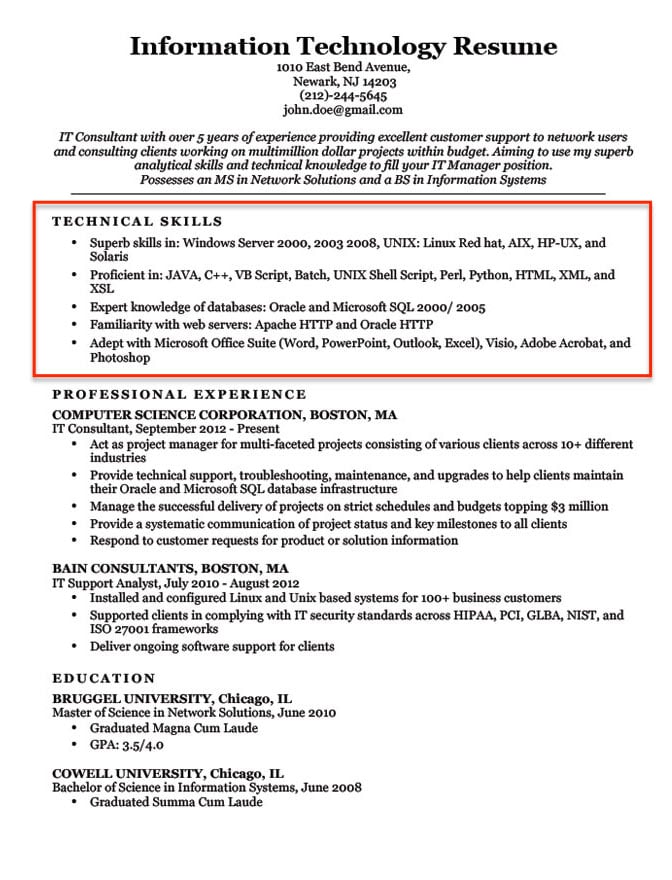
Technical roles may call for more specialised skills, including programming languages, web development, cloud platforms, IT support, network administration or cybersecurity. Be specific: “Python programming” is more informative than “good with computers”.
How to choose the right skills
- Read the job description. Look for named applications, systems and digital tasks. Prioritise the skills the employer requests.
- Be accurate. Only list tools you have genuinely used. Be prepared to discuss your experience at an interview.
- Use specific terms. Name the software and describe what you can do with it, rather than relying on broad phrases such as “IT skills”.
- Show the level of ability where helpful. You might describe yourself as a beginner, intermediate or advanced user, provided the description is honest.
- Connect skills to results. Where possible, explain how you used a tool to complete a task or improve a process.
How to list computer skills on your CV
You can add a concise skills section, usually after your profile or work experience. For roles where digital ability is central, give the relevant skills more prominence. You can also demonstrate them in your work history rather than listing them without context.
Example skills section
Digital skills: Microsoft Excel (formulas, charts and pivot tables); Microsoft Word; Outlook; Teams; Salesforce CRM; accurate data entry and digital record-keeping.
Example within work experience
Administrative Assistant, Example Company
Prepared weekly Excel reports, maintained customer records in the CRM system and coordinated team meetings using Outlook and Microsoft Teams.
Computer skills by career area
- Administration: word processing, spreadsheets, email, calendars, data entry and document management.
- Customer service: CRM software, live-chat platforms, ticketing systems and accurate digital record-keeping.
- Marketing: content management systems, email marketing platforms, analytics tools and social media scheduling software.
- Finance: advanced spreadsheets, accounting software, reporting tools and financial databases.
- Design: graphics, illustration, video-editing and prototyping software.
- IT and software development: operating systems, programming languages, cloud services, version control and technical support tools.
What to avoid
Avoid vague claims such as “computer literate” unless you explain what that means in practice. Do not list every programme you have ever opened, and leave out outdated or irrelevant tools unless the job specifically asks for them. Keep the section easy to scan and make sure it supports the rest of your application.
Final thoughts
The most effective computer skills section is tailored to the job, specific about the tools you know and supported by examples of how you have used them. Focus on practical abilities that will help you do the role, and update your CV as your digital skills develop.
5 Tips for Showcasing Computer Skills on Your CV
- List software relevant to the role.
- Highlight proficiency with Microsoft Office or Google Workspace.
- Include spreadsheet skills such as formulas and data analysis.
- Mention experience with collaboration and project-management tools.
- Add relevant technical skills, such as coding or database use.
List software relevant to the role.
List software that is relevant to the role you are applying for, rather than naming every programme you have used. Check the job description for specific tools and include those you can use confidently, such as Microsoft Excel, Adobe Creative Suite, Salesforce or project-management platforms. Where useful, briefly describe your level of ability or how you have used the software, so employers can see how your skills would support the job.
Highlight proficiency with Microsoft Office or Google Workspace.
Highlighting your proficiency with Microsoft Office or Google Workspace can show employers that you are comfortable with everyday digital tasks. Rather than simply writing “good computer skills”, name the applications you use—such as Word, Excel and PowerPoint, or Docs, Sheets and Slides—and mention relevant abilities, such as formatting documents, using spreadsheet formulas or creating presentations. Be accurate about your level of experience and tailor the examples to the requirements of the role.
Include spreadsheet skills such as formulas and data analysis.
Include spreadsheet skills such as formulas and data analysis on your CV, particularly if they are relevant to the role. Rather than simply listing Microsoft Excel or Google Sheets, specify what you can do—for example, use formulas, sort and filter data, create charts or build pivot tables. If possible, add a brief example of how you have used these skills to organise information, produce reports or support a decision.
Mention experience with collaboration and project-management tools.
Mentioning collaboration and project-management tools can show employers that you are comfortable coordinating work and communicating with others digitally. Include platforms you have genuinely used, such as Microsoft Teams, Slack, Trello, Asana or Monday.com, and be specific about how you used them—for example, to assign tasks, track deadlines, share files or organise team discussions. Tailor your examples to the role, and focus on the tools most relevant to the employer.
Add relevant technical skills, such as coding or database use.
Include technical skills that are relevant to the role, such as coding languages, database management or experience with specific software and platforms. Be precise about what you can do—for example, name the programming languages you use or the databases you have worked with—and, where possible, show how you applied these skills in a project or previous job. This helps employers assess your practical experience and understand how it could benefit their team.