
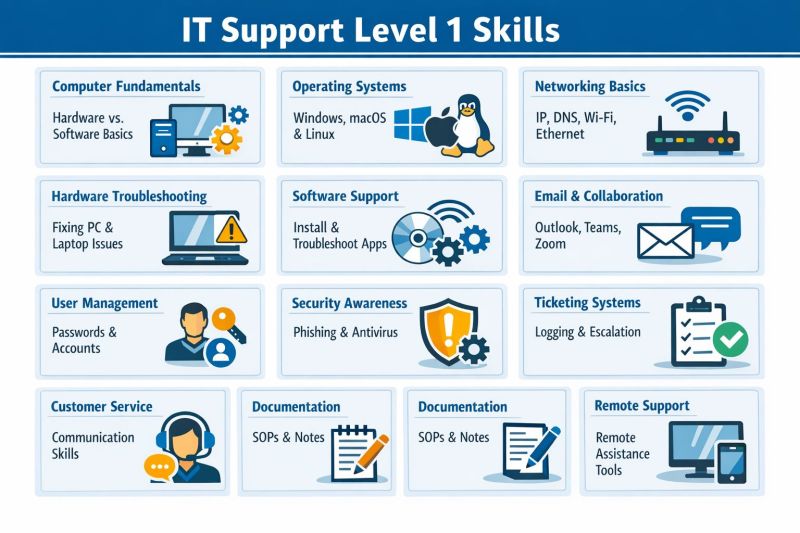
Hardware Skills: A Practical Guide
Hardware skills are the practical abilities needed to understand, install, maintain and repair physical technology. They range from fitting computer components to diagnosing faults in electronic devices. As computers, networks and smart equipment play an important part in everyday life, these skills are useful at home and valuable in many careers.
What Are Hardware Skills?
Computer hardware includes the physical parts of a computer and its connected equipment. Examples include the processor, memory, storage drives, motherboard, graphics card, power supply, monitor, keyboard and printer. Hardware skills involve knowing what these components do and how they work together.
These abilities are not limited to desktop computers. They can also apply to laptops, servers, mobile devices, networking equipment, printers and other electronic systems.
Common Hardware Skills
- Identifying components: Recognising the main parts of a computer and understanding their purpose.
- Building and upgrading computers: Installing compatible components, such as memory, storage or a graphics card.
- Installing peripherals: Connecting and configuring devices such as monitors, printers, webcams and external drives.
- Troubleshooting: Using a methodical approach to identify the cause of problems, including unusual noises, overheating, failed starts or poor performance.
- Basic repairs and maintenance: Cleaning equipment safely, checking connections and replacing suitable components.
- Working with networks: Connecting devices to a router or switch and recognising common physical connection issues.
- Safety and care: Handling equipment carefully, following manufacturer guidance and taking precautions against electric shock and static discharge.
Why Hardware Skills Matter
Practical hardware knowledge can make it easier to solve everyday technology problems. Someone who understands basic components may be able to identify a loose cable, replace a faulty peripheral or decide whether a computer needs more memory or storage.
In the workplace, hardware skills are relevant to IT support, computer repair, network installation, electronics, engineering and technical operations. They can also complement software skills: understanding the equipment a programme runs on can help people investigate performance and compatibility issues more effectively.
How to Develop Hardware Skills
A good place to start is by learning the names and functions of common components. Product manuals, reputable tutorials and introductory courses can help build a foundation. Practical experience is important too, but it should be gained carefully. Begin with low-risk tasks, such as identifying ports or connecting peripherals, before attempting to open or upgrade a device.
When working inside a computer, switch it off, disconnect it from the mains and follow the manufacturer’s instructions. Avoid opening power supplies or other equipment that may retain dangerous electrical charges. If a repair is beyond your experience, seek help from a qualified technician.
It is also useful to practise troubleshooting in a structured way. Note the symptoms, check the simplest possible causes first, change one thing at a time and record the result. This makes it easier to find the source of a fault without introducing new problems.
Combining Hardware and Soft Skills
Technical ability is only part of effective hardware support. Clear communication helps when explaining a problem or guiding someone through a solution. Patience, attention to detail and good record-keeping are equally important, particularly when diagnosing faults or documenting repairs.
Getting Started
Hardware skills grow through a combination of learning, safe practice and curiosity. Understanding the basic components of a device is a useful first step; gradually, this knowledge can lead to more advanced skills in installation, maintenance and repair. Whether the goal is to solve problems at home or pursue a technical career, a careful and methodical approach makes hardware easier to understand.
Enhancing Technical Proficiency: The Benefits of Developing Hardware Skills
- Help diagnose and fix technical problems.
- Support computer upgrades and maintenance.
- Improve confidence with technology.
- Can reduce repair costs.
- Strengthen practical problem-solving skills.
- Are useful in many technical careers.
- Help identify compatible components.
- Encourage careful, methodical working.
Challenges of Mastering Hardware Skills: Costs, Risks, and Rapid Changes
- Can be costly to practise.
- Requires specialist tools.
- Risk of damaging components.
- Static electricity can cause faults.
- Hardware changes quickly.
- Repairs can be time-consuming.
- Some work carries electrical risks.
Help diagnose and fix technical problems.
Hardware skills make it easier to diagnose and fix technical problems by helping you understand how a device’s physical components work together. You can check connections, identify faulty or incompatible parts, and work through possible causes methodically. This can lead to quicker, more effective repairs, reduce unnecessary costs and help you know when a problem needs professional attention.
Support computer upgrades and maintenance.
Hardware skills make it easier to upgrade and maintain a computer with confidence. Understanding how components work together helps you choose compatible parts, such as additional memory or a faster storage drive, and install them correctly. These skills are also useful for routine maintenance, including keeping equipment clean, checking connections and spotting early signs of a problem. Regular, careful maintenance can help a computer run reliably for longer and may reduce the need for costly repairs.
Improve confidence with technology.
Developing hardware skills can improve confidence with technology by helping you understand how devices work and what to do when something goes wrong. Knowing how to connect equipment, identify basic components or troubleshoot a simple fault can make everyday tasks feel less daunting. With practice, you may feel more comfortable trying new devices, making informed choices and solving common problems independently.
Can reduce repair costs.
Can reduce repair costs: Basic hardware skills can help you diagnose common problems and carry out simple repairs yourself, such as reconnecting a loose cable or replacing a faulty component. This may avoid an unnecessary call-out or service fee. For complex repairs, however, it is safest to consult a qualified technician.
Strengthen practical problem-solving skills.
Developing hardware skills strengthens practical problem-solving by teaching you to investigate faults methodically and identify their causes. Whether checking connections, testing components or tracing a performance issue, you learn to assess the evidence, consider possible solutions and make changes carefully. This approach can build confidence, patience and logical thinking—useful abilities both in technology and in everyday situations.
Are useful in many technical careers.
Hardware skills are valuable in many technical careers, including IT support, computer repair, network engineering and electronics. Understanding how physical components work helps professionals install equipment, diagnose faults and carry out maintenance more confidently. These practical abilities can also complement software knowledge, making it easier to solve a wider range of technical problems.
Help identify compatible components.
Hardware skills help you identify components that are compatible with one another before you upgrade or build a computer. By understanding specifications such as motherboard sockets, memory types, power requirements and available connections, you can choose parts that work together and avoid costly purchases or installation problems.
Encourage careful, methodical working.
Hardware skills encourage careful, methodical working. Installing components or diagnosing a fault often requires each step to be followed in the right order, with close attention to detail. By checking connections, following instructions and testing one change at a time, people can avoid mistakes and identify problems more reliably. These habits are useful beyond technology, supporting thoughtful and organised work in many situations.
Can be costly to practise.
One drawback of developing hardware skills is that practical experience can be costly. Learning may involve buying tools, spare components or equipment to practise on, and mistakes can damage parts that are expensive to replace. Although refurbished devices, repair workshops and online simulations can reduce the cost, hands-on practice may still require a significant investment.
Requires specialist tools.
One drawback of developing hardware skills is that some tasks require specialist tools, such as precision screwdrivers, anti-static equipment or diagnostic devices. These can be costly, and buying them may not be worthwhile for occasional repairs. Using unsuitable tools can also damage delicate components or create safety risks, so it is important to check what is needed before starting a job.
Risk of damaging components.
One potential drawback of developing hardware skills is the risk of damaging components while handling or repairing equipment. A misplaced tool, excessive force or failure to take precautions against static electricity can harm delicate parts, sometimes leading to costly replacements or data loss. Following manufacturer guidance, using suitable tools and working carefully can help reduce this risk.
Static electricity can cause faults.
One drawback of working with computer hardware is the risk of damage from static electricity. A static discharge that is too small to feel can still harm sensitive components, such as memory modules or processors, potentially causing faults that are difficult to diagnose. To reduce the risk, switch off and unplug equipment, handle components by their edges, and use an anti-static wrist strap or mat when appropriate.
Hardware changes quickly.
One drawback of hardware skills is that technology changes quickly. New components, standards and devices appear regularly, so knowledge can become outdated and techniques that once worked may no longer apply. Keeping up to date often requires ongoing learning, practice and investment in new equipment.
Repairs can be time-consuming.
One drawback of developing hardware skills is that repairs can be time-consuming. Diagnosing a fault may involve checking several components, testing different solutions and carefully reassembling the device. Even a seemingly simple repair can take longer than expected, particularly if replacement parts are difficult to find or the problem is more complex than it first appears.
Some work carries electrical risks.
Some hardware work carries electrical risks, particularly when repairing or handling equipment connected to the mains. Incorrect handling can cause electric shock, burns or damage to devices, while some components may retain a charge even after they have been switched off. Following safety instructions, disconnecting equipment before working on it and leaving complex repairs to a qualified professional can help reduce these risks.